Understanding Gaming Mouse Features
If you want to level up your gaming mouse, features like polling rate, DPI, and programmable buttons are essential. Discover how different gaming mouse features help propel you to victory.
A good gaming mouse is crucial when you’re grinding to reach the highest ranks. Gaming mice blend performance, comfort, and style to help you stay at the top of your game, even at the end of a long gaming session.
The right gaming mouse makes all the difference in competitive gaming. Learn more about key mouse features and the top Logitech® G recommendations in our comprehensive guide.

If you want to level up your gaming mouse, features like polling rate, DPI, and programmable buttons are essential. Discover how different gaming mouse features help propel you to victory.
Dots per inch (DPI) is essentially the sensitivity setting for your mouse. The higher the DPI, the faster you can move your mouse, which is perfect when you need to do a quick 180 to counter an enemy.
Gaming mice with adjustable DPI are ideal if you play different game genres. Lower DPI settings are more common in tactical shooters, but a lot of gamers use higher DPI for hero shooters and battle royale games. With adjustable gaming mouse DPI, you can change your DPI on the fly so you’re always ready to jump into the next match.
Lower DPI mice like the Logitech G305 LIGHTSPEED are the popular choice when precision is paramount. If you’re playing a battle royale game like Fortnite where you’re constantly scanning and turning, you might prefer a higher DPI mouse like the Logitech G PRO X Superlight 2.
Gaming mice use either optical or laser sensors, and the sensor you choose can have a major impact on your K/D ratio.
Laser sensors are more versatile—you can use them on just about any surface. The biggest downside is that laser sensors are more susceptible to jitters and acceleration which makes them slightly less accurate.
Competitive gamers prefer optical sensors because they’re more accurate, giving you a competitive edge when precision is crucial. The only real downside is that gaming mice with optical sensors can’t be used on many transparent, glossy, and less reflective surfaces.
Optical mice use LEDs and image sensors to track precise mouse movements and help you hit even the toughest shots.
Comfort is crucial for long gaming sessions, so choose a gaming mouse that fits your play style and hand size.
There are three types of mouse grips—palm, claw, and fingertips. If your entire palm and fingers touch the mouse, you use a palm grip. If your fingertips and palm touch the mouse, that’s a claw grip. A fingertip grip is when you only use the tips of your fingers to hold the mouse.
Choose a gaming mouse that fits your hand size and doesn’t feel too light or heavy. The Logitech G502 X LIGHTSPEED is an excellent choice for larger hand sizes, while the Logitech G309 LIGHTSPEED is a better fit for smaller hands. Heavier gaming mice can help you master flick shots without overshooting your target.
Some mice—like the Logitech PRO 2 LIGHTSPEED—feature an ambidextrous design for left- and right-handed gamers.
Programmable buttons can be mapped to in-game actions like jumping and crouching, so you can use your other hand to focus on movement. Programmable buttons are also crucial in MMOs where you need to press tons of hotkeys to activate all your abilities.
The Logitech G502 X Plus is great for MMOs and MOBAs with 13 programmable buttons. You can even use G HUB to set up macros and create profiles for your favorite games, so you can swap from your MMO profile to your FPS profile when you’re jumping on another game.
Polling rate tells you how often your mouse relays its position to your computer. For example, a gaming mouse with a 1,000 Hz polling rate relays its position 1,000 times per second.
Mice with higher polling rates can benefit competitive gamers because they’re more responsive and less prone to input lag. If you want to hit tough no-scopes and pentakills, you need a mouse that responds as fast as you do.
Wired gaming mice are easy to connect and reliable, but the wire can get in the way when you’re gaming. Wireless gaming mice offer more freedom for FPS games, but you have to remember to charge your mouse or replace the batteries regularly.
Modern wireless mice like the Logitech LIGHTSPEED series eliminate latency concerns of the past, so you can enjoy a lag-free experience no matter how you connect. POWERPLAY compatibility also lets you charge your mouse while you game, so your batteries won’t die in the middle of a raid.
The best gaming mice have a sturdy build quality that’s designed to stand the test of time. Your gaming mouse shouldn’t flex or bend when you firmly grasp it, and switches should be rated for at least 20 million clicks.
A well-built mouse can last through years of competitive gaming, even if you’re spam-clicking programmable buttons like your life depends on it.
Build quality is like that clutch factor some gamers have: You can’t put it into numbers, but you know it when you see it. Testing a few different gaming mice is a simple way to find a mouse that feels sturdy and fits your hand size.
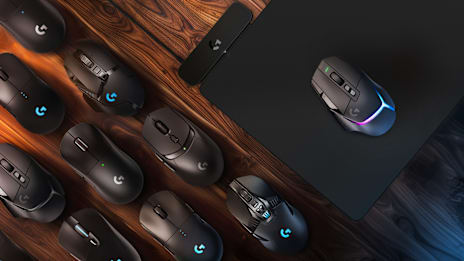
The best gaming mouse depends on your budget, preferences, and what game genres you enjoy. We’ve put together a list of some of the best Logitech G gaming mice whether you’re a casual offline gamer or a competitive tournament player.
The Logitech G305 LIGHTSPEED delivers great lag-free performance at an affordable price and in a small-hand-friendly package. Get the high performance you expect from Logitech G without breaking the bank.
With programmable buttons, tunable weights, and extensive software customization, the Logitech G502 HERO gives you the power to customize your mouse to match your gaming style. Whether you’re a low-and-slow tracker or a high-speed flicker, the G502 HERO can accommodate you.
The Logitech G PRO X Superlight is ideal when you need to hit super-fast flick shots. Thanks to its lightweight design, the PRO X Superlight allows you to hit pixel-perfect shots without wearing out your arm and wrist.
When you have dozens of hotkeys to press in MMO and MOBA games, the Logitech G502 X Plus is the gaming mouse for the job. With up to 11 programmable buttons, there’s room for all your abilities.
The G502 X Plus clocks in at 3.73 oz (106 g), with low-friction PTFE feet that allow it to glide smoothly across mouse pads. Tunable weights allow you to customize the weight of the mouse to your liking.
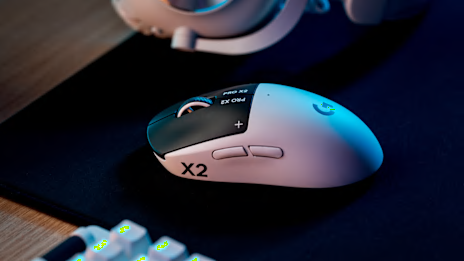
The Logitech G PRO X Superlight 2 is an ultra-lightweight mouse coming in at about 2.22 oz (63 g). When your aim needs to be quick and precise in tactical shooters and FPS games, the PRO X Superlight 2 is perfect.
LIGHTSPEED wireless technology ensures a lag-free gaming experience, and the minimalistic shape is a favorite among pro FPS players. A high-performance HERO sensor also delivers pinpoint tracking to ensure superior accuracy.
Your gaming mouse should offer comfort, performance, and customization. Understanding polling rate, DPI, and other gaming mouse features can help you give your gaming setup a much-needed buff.
The Logitech G lineup is designed to give you a competitive edge in your favorite games. Explore the Logitech G lineup to find the best mouse for your gaming setup.